



















Skip to content

A free literature mapping tool for researchers, students, and academics.

Free Bibliometric Analysis & Literature Mapping Tool

We make bibliometric analysis easy! Upload RIS, WoS, PubMed, Scopus, or BibTeX files and get bibliometric charts and data for your literature review.

Upload your references

Generate presentation-ready data visualizations for your systematic literature review. Upload references and receive charts for trends, citations, collaboration, and keywords.

  • Completely free!
  • RIS, PubMed (.nbib), BibTeX, WoS "Plain text file" export, and Scopus CSV
  • Export from Endnote, Mendeley, Zotero and other reference managers and upload here
  • Data visualization including research impact, co-citation networks, collaboration networks, and more.
  • Download charts and insert into Word or PowerPoint
  • Up to 20,000 references / 50MB total filesize.
  • This is a FREE service.
Required. We'll let you know once your files are ready. Comma separate multiple addresses.

Drag & drop files here

or click to browse

No files selected

RIS (.ris / PubMed .nbib / EndNote .txt), BibTeX (.bib), Web of Science "Plain text file" export (.txt) or Web of Science CSV (.csv), or Scopus CSV (.csv). You receive an interactive HTML bibliometric report. The full dataset is emailed as Excel. Up to 20,000 references / 50MB total filesize.
Optional source labels help identify citations in your report. Remove any file before submitting.
Uploading your files…

This may take awhile depending on file size. Please keep this page open.

What you get

A shareable online dashboard showing bibliometric data and charts based on your reference files.

Overview summary

Documents, sources, authors, timespan, growth rate, and co-authorship indicators.

Excel dataset

Full analysed dataset emailed as Excel (.xlsx) for 7 days.

Sources & SCImago quartiles

Most relevant journals with SJR quartile and production over time.

Authors & collaboration

Author productivity, countries, institutions, and collaboration maps.

Keywords

Treemap of top keywords and trends over publication years.

Transparent methods

Information tabs explain calculations, references, and data limitations.

As used by students at ...

  • Charles Sturt University
  • Indira Gandhi National Open University
  • KAIST
  • KU Leuven
  • Monash University
  • National University of Singapore
  • North-West University
  • Universitas Padjadjaran
  • Queen's University
  • The Open University
  • The University of Western Australia
  • Universidad Argentina de la Empresa
  • Universidade Estadual Paulista (UNESP)
  • University of London
  • University of Reading
  • University of Tokyo
  • Université Paris Cité
  • Utrecht University
  • Vietnam National University, Hanoi
  • Yale University

How it works

From export to bibliometric dashboard in three steps.

  1. 1
    Export from your databases or libraries
    Include as many fields as possible e.g. Authors, Year, Source, Citations etc. If exporting from Web of Science, export as "Plain text file" (not Tab delimited).
  2. 2
    Upload and run the analysis
    We parse your uploaded files, and compute metrics such as author frequency, common keywords, collaboration, and more.
  3. 3
    Explore and download
    Review the interactive report online and download the Excel dataset from your email.

A note from Gary

Why I created this bibliometric analysis tool

This tool is designed for early-stage researchers, undergraduates, master's students, and late high school students.

Bibliometric analysis arguably advances critical thinking skills, a key educational objective (1, 2). Many schools, colleges, and universities require students engage in research based learning, including bibliometrics (and often as part of systematic literature reviews and scoping reviews)(3). Yet, in my experience lecturing, I found there isn't enough time for lecturers to explain the bibliometric process in full. Furthermore, students noted that they spend significant time calculating various bibliometrics rather than critically analyzing the output. I found that students who were not comfortable with the mathematical side of bibliometrics often failed to benefit from the analysis (cognitive load theory may explain why students do not fully advance critical skills because of this initial mathematical requirement, and limited time (4)). There are, of course, other good tools that generate bibliometrics from references; however, barriers remain, such as the need to use R or Python.

I therefore created this tool for my students. From my perspective, I've found very positive results. I find students engage far more as the limiting factor (mathematics) is no longer a barrier. I've also noticed far better critical thinking in submitted assessments. Students no longer report negatives about the time spent on calculations, and satisfaction results have improved significantly.

Please let me know how you've used this tool.

Regards
Gary

For lecturers/teachers

There are many ways a lecturer or teacher may use bibliometric analysis to further a student's learning. Here are two ways I use this tool (considering constructive alignment (5)):

  1. In all classes I teach or tutor, in initial workshops I:
    • Ask students to obtain references for literature associated with the unit content (from e.g. Web of Science).
    • Get students to use this bibliometric tool.
    • Discuss the findings in groups and as a class.
    I find this valuable as experiential learning, and it helps prepare students for the unit content by immersing themselves in the topic early. I also like that students are required to use an academic database (or even Google Scholar).
  2. Where a student is required to create an academic review of multiple literature sources (such as a systematic literature review).
    • I recommend the first two steps as above.
    • I ask students to insert the generated images and critically analyze.
    This is a good exercise. I've found this helps encourage students to perceive the literature in terms of topics rather than individual works (a requirement of systematic reviews (6)).

For students

Think of this tool as a simple way to gain more knowledge and higher marks. Bibliometric analysis is widely used in education. This tool removes the hard work of using complex mathematical formulas or scripting in Python or R. Simply enter your list of references and then discuss the results as relevant to your assessment.

Here are a few tips when addressing bibliometrics in your assessment:

  1. Download relevant images from the results and insert them into your paper or presentation.
  2. Question the output and mention the strengths and limitations of the analysis. This is part of critical thinking and critical analysis.

References

  1. OECD. Teaching, Learning and Assessing Creative and Critical Thinking Skills 2024 [Available from: https://www.oecd.org].
  2. Bloom BS. Taxonomy of educational objectives: The classification of educational goals, 1st ed. Harlow, Essex, England: Longman Group; 1956. np, np–np, np p.
  3. Lambert C. Pedagogies of participation in higher education: a case for research–based learning. Pedagogy, Culture & Society. 2009;17(3):295–309. https://doi.org/10.1080/14681360903194327
  4. Sweller J, Ayres PL, Kalyuga S. Cognitive load theory. New York: Springer; 2011. https://link.springer.com/book/10.1007/978-1-4419-8126-4
  5. Biggs J. Enhancing teaching through constructive alignment. Higher Education. 1996;32(3):347–64. https://doi.org/10.1007/BF00138871
  6. Page MJ, McKenzie JE, Bossuyt PM, Boutron I, Hoffmann TC, Mulrow CD, et al. The PRISMA 2020 statement: an updated guideline for reporting systematic reviews. BMJ. 2021;372:n71. https://doi.org/10.1136/bmj.n71

Click to view larger image

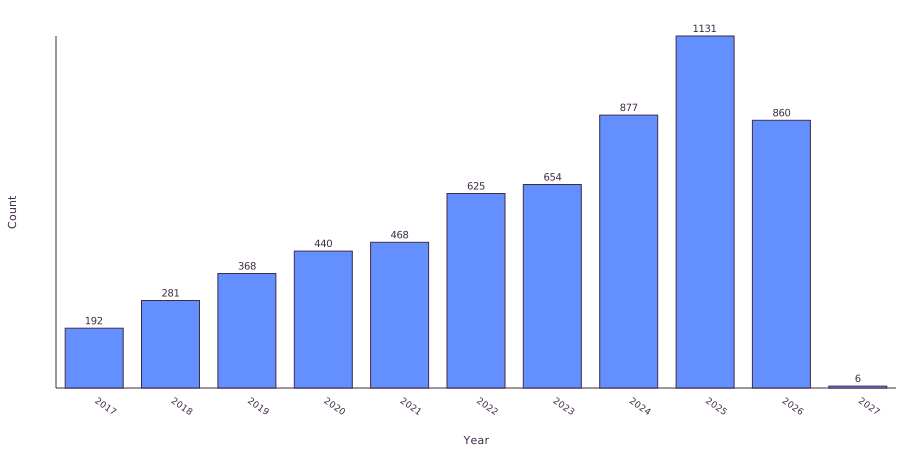
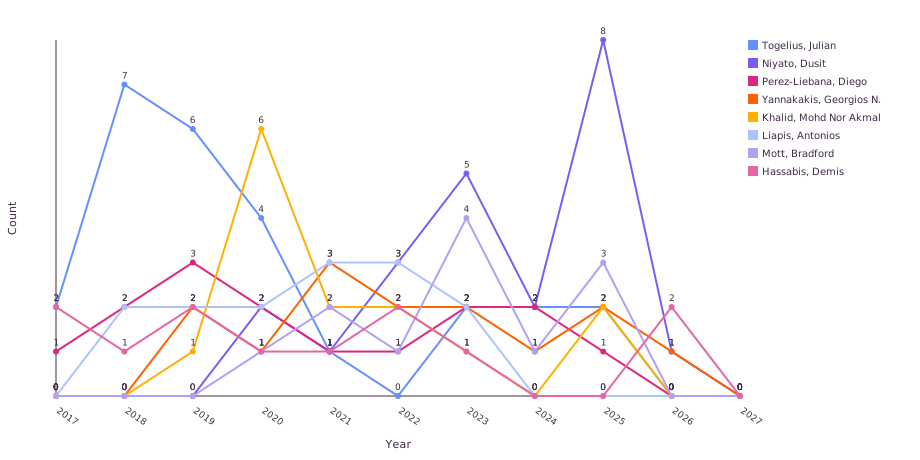
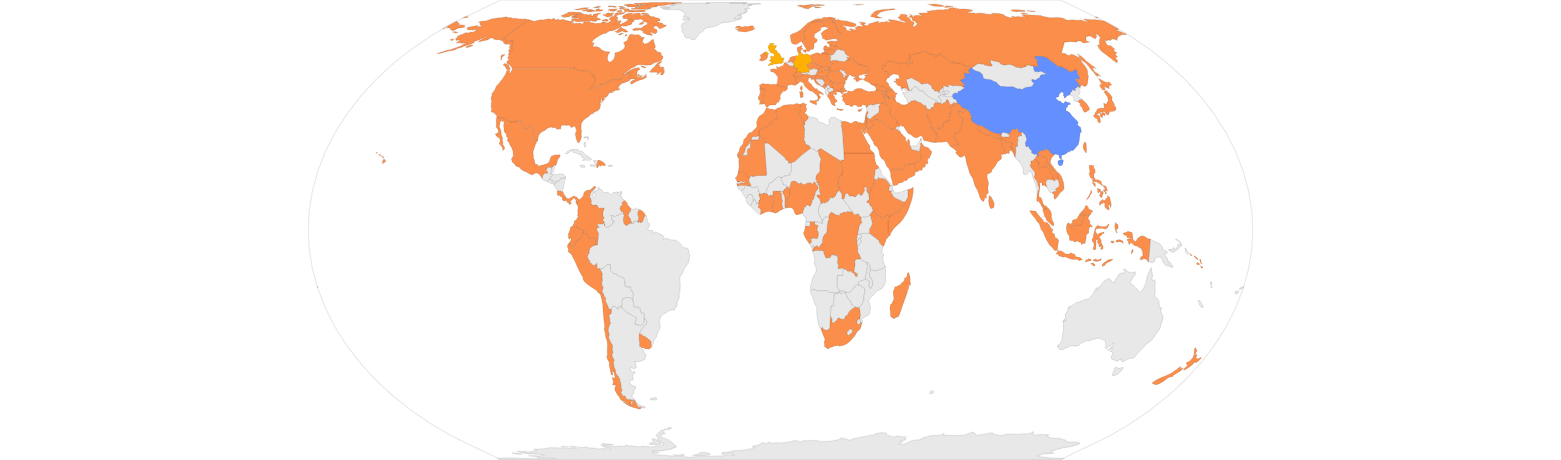
Images from (1)

FAQ

Quick answers about bibliometric analysis.

What does this tool do?

It produces bibliometric analyses from your reference exports, including publication years, sources, authors, keywords, cited references, and collaboration indicators.

Which input formats are supported?

RIS (.ris / PubMed .nbib / EndNote .txt), BibTeX (.bib), Web of Science "Plain text file" export (.txt) or Web of Science CSV (.csv), and Scopus CSV (.csv).

Which fields should I export from WoS, Scopus etc?

Export as many fields as you can. The more fields you provide this bibliometric tool, the better the results.

How do I export from Web of Science?

Select your records in Clarivate Web of Science, click Export, and choose Plain text file (not Tab delimited file). Upload the resulting .txt file here. Excel or CSV exports from Web of Science are also accepted as .csv files.

Can I export from EndNote and import into this tool?

Yes. 1. Open EndNote and select the references you want to export. 2. Click 'File' > 'Export' from the top menu. 3. Choose a destination folder and type a file name. 4. Set 'Save as type' to 'Text File (*.txt)'. 5. Set 'Output style' to 'RefMan (RIS) Export'. If it does not appear in the dropdown menu, click 'Select Another Style...' and search for 'RefMan (RIS) Export'. 6. Click Save. 7. Locate the saved .txt file and rename the file extension from .txt to .ris. 8. Upload the .ris file into the form on this page. Note: Instructions adapted from Babson University libguide.

Which output files do I get?

A shareable HTML report with charts you may download to insert into Microsoft Word, PowerPoint and other software, plus an Excel file of your full dataset.

Is this tool free?

Yes. Researcher's Friend is free to use. You may process up to 20,000 references per job (50 MB combined upload size limit).

How long are my data available?

Your bibliometric analysis is available on a unique URL (we'll email the URL to you) and is available indefinitely.

How does this tool compare with other science mapping tools?

This web-based tool offers a no-code and easy to use alternative to VOSviewer and Bibliometrix. Other tools may however offer more options.